Most demo videos don’t fail because the product is boring. They fail because the video tries to be a TED Talk, a user manual, and a complete genealogical record of every button it’s ever loved.
Our “short and sweet” demo videos clock in under five minutes—because attention spans are delicate woodland creatures and we refuse to frighten them. We focus on one thing: a specific feature or product update you want customers to understand quickly. We open with a brief intro and value proposition (i.e., why this matters to you), then we demo the feature. No wandering. No lore. No “let’s just click around and see what happens.”
Think: feature spotlight. Not: feature documentary.
What we need from you
We’re very good at clarity. We are…adequate at telepathy. (But only on Tuesdays. And only if Mercury isn’t doing that thing again.)
To get started, we need two things:
- Your talking points. During or after our initial interview, we need a sense of what you want the voiceover to say. This can come from a blog post, product documentation, or even a recent event recording—anything that already captures the story. If you’ve got a demo already recorded, that works too. Translation: give us the bullet points, and we’ll turn it into a script that doesn’t ramble.
- Your demo vision (and access to a demo tenant). We also need to know what you want to show in the demo and access to a demo tenant to record it, unless you’re providing the demo recording. If you’re recording from your own environment, our preferred resolution is 2560 x 1440 with 125% zoom in the web browser. (Because tiny text is the villain in most demo videos.) For the full spell book, see Recording guidelines to make your demos sparkle—it contains ancient wisdom, modern settings, and at least one strong opinion about tiny text.
Need to share screenshots, docs, reference files, or anything else? We’ll send you a link to our asset upload page, which makes securely sharing those files with us easy-peasy. (Did you just say “lemon-squeezy” in your head?)
How we make the thing
Once we have your topic, talking points, and a demo tenant (or your demo recording), our production pipeline begins to flow. And yes—there are actual humans in it. Skilled ones. Mildly caffeinated ones.
Step 1: We write the script
We build the video script first—because the script is the choreography behind the whole production. It decides what’s said, what’s shown, and what gets mercifully cut before it breeds complexity.
Our scripts include:
- A header section containing nitpicky details we like to document.
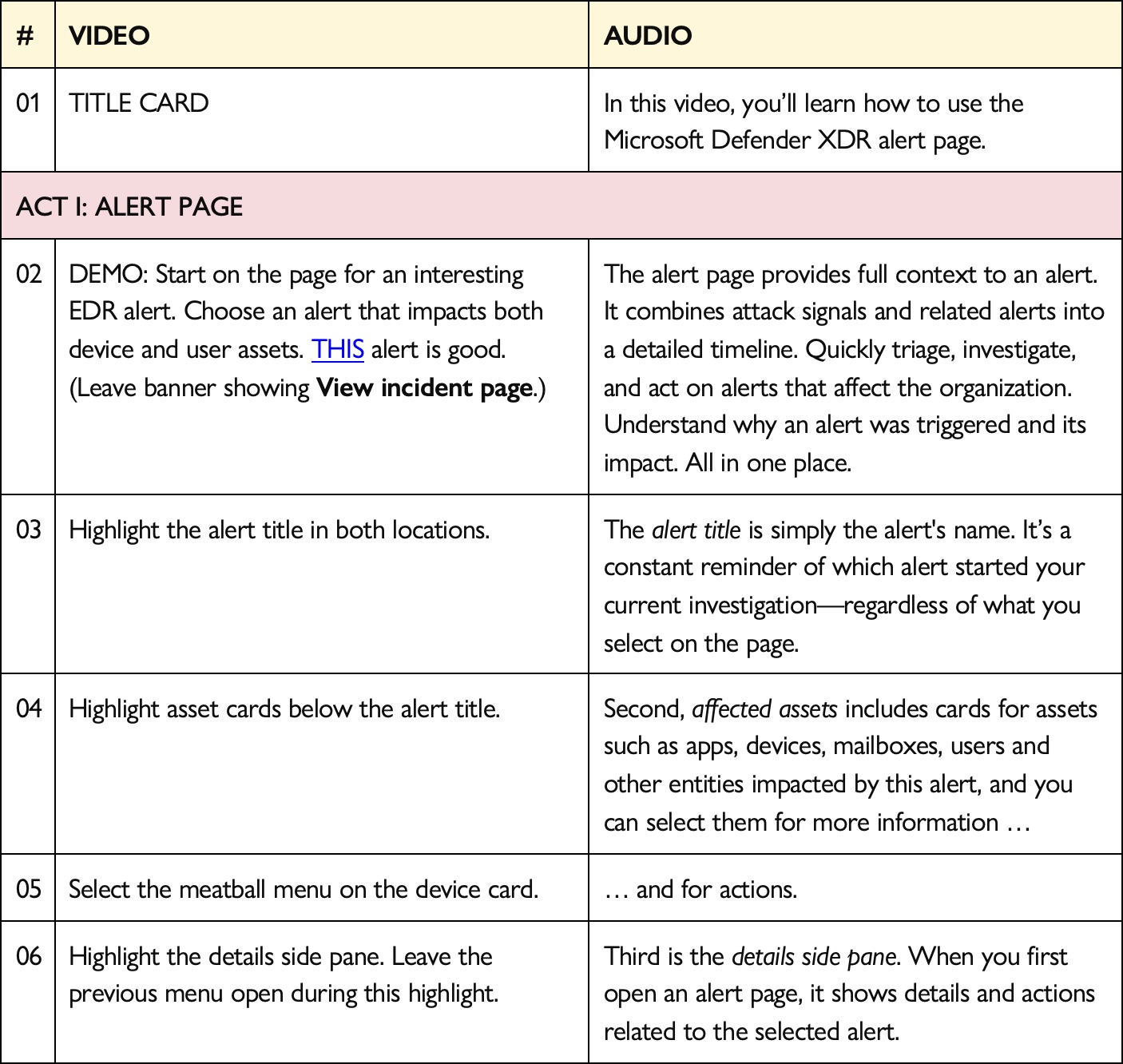
- A two-column table that makes reviewing, recording, and editing blissfully straightforward:
- Video track. The left column describes the step-by-step instructions for recording and editing the demo. The visuals live in this track.
- Audio track. The right column contains the voiceover, and it lines the audio up with each step of the video track.
Step 2: You review the script
Quickly, please—our timeline has feelings. We ask that you provide feedback directly in the script file:
- Leave notes for edits and questions.
- If you edit text directly, use Track Changes.
The important part for you: carefully review and approve the audio track before we record the voiceover. That’s where accuracy, terminology, and tone get locked in. Once we’ve recorded the voiceover, changes to the script other than deletions or maybe moving around audio usually means a new studio session—which delays the video and mildly upsets the laws of time, budget, and physics.
Timeline-wise: the sooner the better. Ideally within 2 business days, and no longer than a week—because we can’t move forward until the script is approved.
Step 3: We record the audio
Once the script is approved, we record the voiceover in our studio with voice actors. These voice actors are credible because they’re nerds, too—and they can pronounce your product names without flinching. (The mic approves.) This is where the words get their final sparkle—clean, consistent, and blissfully free of “um” and “sorry, my dog barked.”
Step 4: We edit the video timeline
And make it look like it belongs on the internet. With voiceover recorded, we cut the video together—demo footage, pacing, polish, and any supporting motion graphics needed to keep the story readable and the viewer oriented.
We thread your branding through the video—title card, lower thirds, stingers, end cards—the whole tasteful parade. Your pixels will feel properly supervised. We can use your elements or create something custom just for you. Then we send you a first cut for review.
Step 5: You review the first cut
We’ll send you a Frame.io link where you can leave timecoded notes on the video. You can even annotate the video, if you’re really motivated. No account required.
The workflow is simple:
- Watch the video
- Pause at the exact moment you want to leave a note
- Leave a note in the side pane
- Tell us when you’re done reviewing
We address your notes, apply final edits, and send it back for your approval. After you approve the video, we’ll build closed captions and audio description—because accessibility is built into every video we produce.
That’s it. Your video is ready to publish. We’ll share the final deliverables—often YouTube-ready first, and downloadable files if you want them too.
Where to from here
When we’re done, you have a finished “short and sweet” demo video that sparkles. It introduces the topic, explains the value proposition, and clearly demonstrates the workflow. Not a second of running time wasted.
These videos are primarily built for YouTube, but you can embed or repost them anywhere—product pages, documentation, and wherever you need clarity. But we do recommend that you limit where you post it to make analytics easier. Analytics help prove that the video was worth doing in the first place.
UIs love a costume change
Things change. Products evolve. Buttons move. Labels get renamed. (UI does love a costume change.)
If you need to edit a video after publishing:
- Title or description updates on YouTube are quick and easy.
- Content changes require a conversation (because edits range from “tiny tweak” to “new video in a trench coat”).
Our big promise
We bring the production team—technical producers, editors, animators, voice actors, release managers, and other seasoned professionals—to turn your feature into a high-quality short demo video.
You bring the truth:
- What the feature does
- Why it matters
- What you want shown
Together, we make something customers can actually finish watching—then immediately understand.
And that’s the whole point.